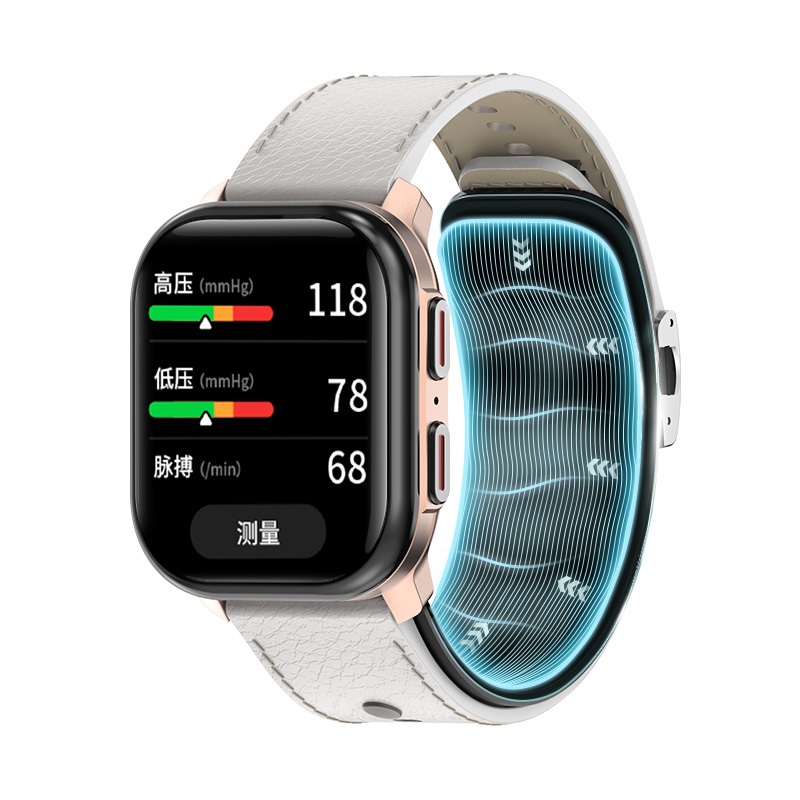
Device selection looks like a comparison problem and behaves like a requirements problem. The reason is simple: in a connected monitoring workflow the device is not a purchase, it is an interface — it sits between a person's body and a data path that somebody else has to operate. Get the order right and the comparison becomes short, because most candidates are eliminated before they are compared. Get it wrong and the comparison looks thorough while quietly testing devices against a requirement nobody has written down.
This guide runs the selection in the order that survives contact with a real deployment: intended use first, then the measurement model, then the connectivity operating model, then the measurement protocol and the training it implies, then the documentation package. It closes with the six ways this decision usually fails and where each one is still cheap to fix.
1. Write the Intended Use Before You Look at Hardware
Four fields are enough, and all four have to be written down rather than agreed in a meeting. The value of writing them is that each field either creates a device requirement or eliminates candidates — which is exactly what a specification sheet cannot do for you.
Who takes the measurement
A clinician, a care worker, or the person themselves?
Creates: It sets the skill level the device has to assume, and therefore how much of the protocol can be automated versus taught. A self-measured workflow needs a device that guides the session; a staff-measured workflow can tolerate a device that simply records one.
Eliminates: It removes any device whose measurement requires positioning an operator cannot reliably reproduce unaided.
Who reads the result
The participant, a remote clinician, a care team, or an automated rule?
Creates: It sets where the data actually has to land, which is a data-path requirement before it is a device requirement. A reading nobody is scheduled to look at is a reading that will not be acted on.
Eliminates: It removes any architecture that cannot deliver the reading to that reader within the interval the intended use assumes.
What we will say about the reading
What sentence will your organisation publish or hand to a participant?
Creates: It is the single most constraining field, because the claim set bounds what the device may be described as doing. Write the sentence before the specification sheet — the reverse order is how programmes discover a promise is unsupportable after the hardware has been chosen.
Eliminates: It removes devices whose documented function cannot support the sentence. If the sentence implies diagnosis, guaranteed accuracy or a treatment outcome, no device we build supports it.
What happens when a reading is out of range
Who is contacted, how quickly, and through what route?
Creates: It defines the escalation requirement, which is an operational design decision that has to exist before the deployment rather than during it. It also determines whether the workflow needs a human review step at all.
Eliminates: It removes configurations with no mechanism for the reading to reach a person who can act — a measurement that cannot be escalated is a data-collection exercise, not a monitoring workflow.
The third field is the one that decides how much freedom you have later, because it is the sentence your organisation will actually publish or hand to a participant. Write it in plain language and check it against the boundary any connected service has to respect: none of our products is claimed certified or registered in any market, nothing here diagnoses, no accuracy is guaranteed, and no treatment outcome follows. If the sentence you want to publish needs one of those, the problem is the sentence — changing devices will not fix it.
2. Check Which Family Can Even Serve That Intended Use
We build three families, and they are not interchangeable. They differ in where the measurement comes from and in what they are for — which is a selection criterion before it is a specification question.
| Family | Measurement Origin | Wear Model | Serves an Intended Use Built Around | Does Not Serve |
|---|---|---|---|---|
| Wrist blood-pressure watch (VC60, VC61, VP20, VP21) | The watch obtains the measurement, through the airbag and pump architecture described in the source material. | Worn continuously; measured deliberately, on a schedule or on demand. | Scheduled or on-demand blood-pressure readings that form part of a monitoring routine. | An intended use that assumes a diagnostic reading, guaranteed accuracy, or a treatment decision made by the device. |
| Smart ring (CARE2) | Sensors in the ring itself, as described in the source material. | Worn as an everyday item, continuously. | An everyday data stream where continuous wear matters more than a scheduled measurement session. | Scheduled clinical-style measurement, disease-screening inference, or any use in water beyond daily wear. |
| CGM & connected monitoring (S10) | A separate single-use adhesive sensor on the upper arm obtains the measurement; the watch and app are display endpoints. | Sensor worn for its wear period; the display device worn or carried as normal. | A connected monitoring service that routes sensor readings to a display and a review point. | Any assumption that the watch measures glucose. A watch or app showing a glucose value is displaying a reading the sensor obtained. |
The boundary worth reading twice
For the CGM family, the glucose-sensing element is a separate single-use adhesive sensor applied to the upper arm. A connected watch and the companion app present the synchronized data that sensor obtained. They are display endpoints. If a workflow plan anywhere says "the watch measures glucose", the plan has modelled the system incorrectly, and the correction is architectural rather than editorial — it changes who is responsible for what at the sensor.
3. Choose the Connectivity Model, Not the Connectivity Feature
Cellular and Bluetooth Low Energy are usually compared as features. They are better understood as two operating models with different failure modes and different support costs, and the right way to choose is to ask which failure mode your organisation can actually staff.
| Decision Axis | Cellular | Bluetooth Low Energy |
|---|---|---|
| Where data can leave the device | From the device itself, without another device being present. | Through a paired phone acting as the gateway. If the phone is absent, unpaired or unpowered, data does not move. |
| What the participant has to carry | The device. Nothing else is required for the data path to exist. | The device and a charged, paired phone, with the companion app installed and permitted. |
| Support burden when the link fails | One support surface, but it is remote and you cannot ask the participant to re-pair anything — diagnosis happens through the device's own reporting. | Two support surfaces. Many failures are resolved by guiding the participant through phone-side steps, which is cheaper per incident but more frequent. |
| Provisioning before first use | Each device carries its own connectivity provisioning, so provisioning is a per-device step. | Provisioning is mostly a per-phone step, which is generally faster at onboarding. |
| Intended uses it excludes | Uses where the participant or the site cannot accept per-device connectivity handling, or where cellular service is not available where the device will be used. | Uses where the participant cannot be relied on to carry, charge and maintain a paired phone, or where support staff cannot walk someone through pairing. |
| What to confirm in writing | Coverage in the actual operating location, and what happens to readings taken while the device has no connection. | Which phone platforms and versions are supported, and what the app does with readings it has not yet transferred. |
Two practical consequences follow. First, the participant burden is not a minor column: a workflow that depends on a charged, paired phone has an onboarding step and a recurring support conversation that a cellular workflow does not. Second, the terms you have to confirm in writing differ by model — coverage in the actual operating location for one, supported phone platforms and offline behaviour for the other. Ask for both in writing rather than inferring them from a product description.
4. Plan the Measurement Protocol and Cost the Training It Implies
The protocol is the set of conditions under which a measurement counts. It is written by the organisation, not supplied with the device — and every condition in it implies a skill somebody has to teach, at onboarding and again at every device replacement. That is why training burden is a selection criterion rather than an implementation detail: it scales with participant count, and two devices that look equivalent on a specification sheet can differ substantially in what it costs to run them across a few hundred people.
| Protocol Condition | Why It Exists | Training It Creates |
|---|---|---|
| Posture and positioning | A measurement taken in the wrong position is a measurement that will be questioned later, and the participant is the one who has to reproduce the correct position every time. | Taught at onboarding, checked at the first few sessions, and re-taught whenever a participant reports an implausible result. |
| Rest interval before a reading | The interval is part of the measurement protocol, not a suggestion — it has to be observed by whoever takes the reading. | The most commonly skipped instruction, and the one that fails silently: the reading still arrives, it is just taken under the wrong conditions. |
| Placement of the cuff, airbag or sensor | Placement determines whether the measurement is taken at all, and placement instructions differ by family — a wrist device, a finger-worn ring and an upper-arm adhesive sensor are not interchangeable habits. | The heaviest onboarding item, and the one that has to be repeated at every device replacement rather than assumed to carry over. |
| What to do when a reading looks wrong | Without a written instruction, participants either stop measuring or keep measuring without telling anyone — both destroy the value of the data. | Requires a re-measurement rule and a defined route for flagging an anomalous session, both of which are operational content you have to author. |
| Recording and session logging | A reading that is not associated with a participant and a time is not reviewable at the receiving end. | Largely automated by the app, but the participant still has to know that the session is being recorded and what they are expected to do if it is not. |
| Device care and wear limits | Wear limits are product limits: the watch IP67 rating covers short-term shallow immersion only, with no swimming and no hot water; the ring is for daily use only, excluding swimming, hot springs and prolonged submersion. | Belongs in the onboarding material rather than in small print, because a participant who wears a device into water they were never told to avoid generates a support incident and a data gap. |
One of these conditions deserves its own sentence, because it is a product limit rather than a protocol choice: the watch's IP67 rating covers short-term shallow immersion only — no swimming and no hot water — and the ring is for daily use only, excluding swimming, hot springs and prolonged submersion. Participants who were never told this will generate both support incidents and data gaps, so it belongs in the onboarding content rather than in the small print of a leaflet nobody reads.
5. Obtain the Documentation Package Before You Commit
Documents are not reassurance; they are answers to specific questions. The failure pattern in this category is not a missing document — it is a genuine document read out of scope and treated as covering more than it does. For each category below, read the scope line, and read the holder, before you repeat its existence as comfort.
| Document Category | The Question It Answers | The Question It Does Not Answer |
|---|---|---|
| Specification sheet | What the device is, in its current revision. | It does not tell you that the device is suitable for your intended use, and it is not an approval of anything. |
| Device-level declaration or conformity documentation | Which declarations attach to the specific named model and the specific directives they cover. | It does not cover a different model in the same family, and it is not a medical authorization or a market registration. |
| Kit and shipping configuration | What physically arrives, in what condition, and how it is packed. | It does not establish the commercial terms of the shipment, and it does not describe the service around the device. |
| Label artwork control | Who controls what is printed, and how printed content stays aligned with the approved claim set. | It does not authorize any claim — it is the mechanism that keeps claims consistent, not a source of new ones. |
| Data-interface terms | What the device or the cloud layer may send, in what form, and to whom. | It does not prove that your receiving platform can consume it. The interface scope, hosting and residency still have to be confirmed — see the open items on the hub. |
| Factory and process documents (production licence, quality-management certificate) | The manufacturing and quality environment the product comes out of, within a stated scope. | They are not product authorizations. A bounded scope on a factory document is a limitation, not a formality — read the scope line before you repeat the document's existence as reassurance. |
Still open, and named rather than assumed Not confirmed
- The concrete interface scope per family — SDK/API documentation availability and which integration patterns are supported.
- Data residency, retention defaults and hosting location for any cloud layer.
- Supported languages and app publishing ownership.
- MOQ, tooling or setup charges, sample terms and lead time.
These are the items that most often decide whether an integration is straightforward or expensive. Ask for them in writing before you finalise a selection, and treat an unanswered item as a risk rather than as a detail to sort out later.
6. Six Ways This Decision Fails, and Where It Is Still Cheap to Fix
Selection failures are rarely caused by a bad device. They are caused by a decision made in the wrong order, and most of them are recoverable up to a specific point — after which the cost moves from a conversation to an onboarding programme.
Starting from a device instead of an intended use
How it looks: The comparison table is being filled in before the four worksheet fields are written.
Still cheap while: Still cheap. Stop and write the worksheet. Nothing has been ordered.
Choosing connectivity by feature list rather than by support model
How it looks: The decision was made by asking which option is better, rather than which failure mode the organisation can staff.
Still cheap while: Cheap before ordering, expensive after the first support month. Model the support burden explicitly while the choice is still open.
Assuming an interface inventory exists because integration is described
How it looks: The plan depends on a data bridge that no document describes.
Still cheap while: Recoverable until the integration sprint starts. Ask for the interface scope in writing before you design around it.
Treating a certificate as a product authorization
How it looks: A genuine factory or quality document is being repeated as evidence that a product is authorized in a market.
Still cheap while: Recoverable until the claim is published. Read the scope line and the holder, and correct the claim before it goes out.
Discovering the training burden after onboarding is planned
How it looks: The onboarding plan assumes the protocol teaches itself.
Still cheap while: Recoverable before the pilot. Count the protocol conditions and decide who delivers each one.
Settling the documentation package after the pilot instead of before it
How it looks: A pilot is running on a device whose documentation has never been reviewed against the intended use.
Still cheap while: Recoverable at any point, but the cost is that the pilot may have tested the wrong configuration — which is the most expensive kind of pilot to discover late.
7. Where to Go Next
Once a device is selected, the next decision is not a purchase decision — it is how to find out whether the workflow completes end to end. That is a pilot, and it has its own guide: how to plan a connected monitoring pilot, covering the written question a pilot should answer, the variables a device count depends on, the six-hop data-flow map with an owner on every hop, the authorization worksheet, and success criteria that are deliberately not clinical-outcome claims.
For specification and model detail, this guide deliberately stops short. Family-level and model-level information is owned by the product pages, where each model is documented in its own right: the blood-pressure watch family (VC60, VC61, VP20, VP21) and its model pages, the smart ring family and CARE2, and the CGM & connected monitoring family with the S10 separate sensor and its display layer.
If you are still assembling the requirement rather than selecting against it, the full integration-requirements path sets out the five decisions, the platform-layer allocation and the pilot-to-scale stages. If your organisation sits on the commercial side of this decision instead — branding, private-label or distribution — the matching path is the separate Health Brands & Distributors route.